

Details, review, approved
Send your details
1
Choose your registration
Enter a GSTIN, CIN, LLPIN or Udyam number in India, or your ABN in Australia. Working on your own? Register free on the Udyam portal.
2
Add business details
Registered name and address, an authorised person, and what you will use AI calls for.
3
Attach the certificate
PDF, JPEG or PNG, up to 5 MB, signed and sealed by an authorised signatory. Only Marro’s team can open it.
4
Business number
Leave Get a business number ticked to have one set up, at the monthly price shown, paid from your wallet.
5
Confirm the calling rules
You call people who enquired or agreed to hear from you, respect the Do Not Disturb register, and call between 9 am and 9 pm.
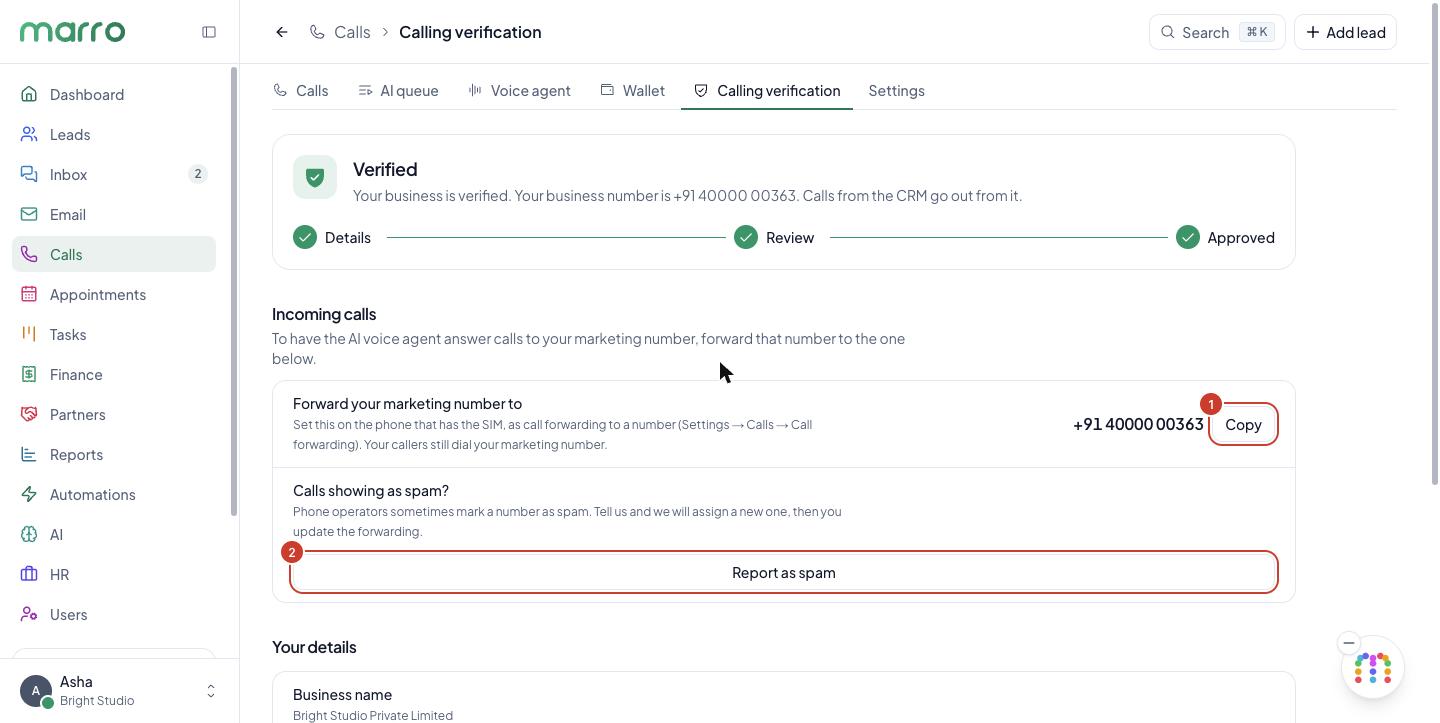
Forward your marketing number
To have the agent answer your advertised number, forward it (phone Settings → Calls → Call forwarding) to the Marro number under Incoming calls.1
Copy the number
Find it under Incoming calls on this page.
2
Forward your marketing number
In your phone’s call forwarding settings.
Report as spam
If an operator marks your number as spam, report it here: Calls to the old number still reach you until that date.Ask Marro
Try asking
“Is our calling verification approved?”Marro tells you the status and what is still needed.